Task Report Push
Register a callback endpoint to receive task report notifications in real time. Group‑level delivery is now supported.
- Compatibility: For subscriptions created or re‑saved on or after 2025‑05‑15, the new top‑level field format described below takes effect.
- Existing subscriptions keep the legacy two‑level structure (
appId+payload) and continue to work without change. - New top‑level fields (siblings of
appIdandpayload).
Integration flow
Step 1: Configure the callback URL
- Sign in to the Developer Center and open Enterprise callback URL. This page covers the task report callback URL block, which is independent of the event callback.
- Choose the push account. It must be a developer of this customer and is the only person who can modify this page. It also determines the push scope: task reports are pushed only for robots directly bound to that account. Robots that belong to the customer but are not directly bound to the account are not pushed. The event and task callbacks share one push account.
- Click Modify in the block, enter the callback
url, turn on the push switch, and click Save. - The platform then issues the
AppIdandSecretfor this subscription. TheSecretis shown again only after a reset, so save it immediately.
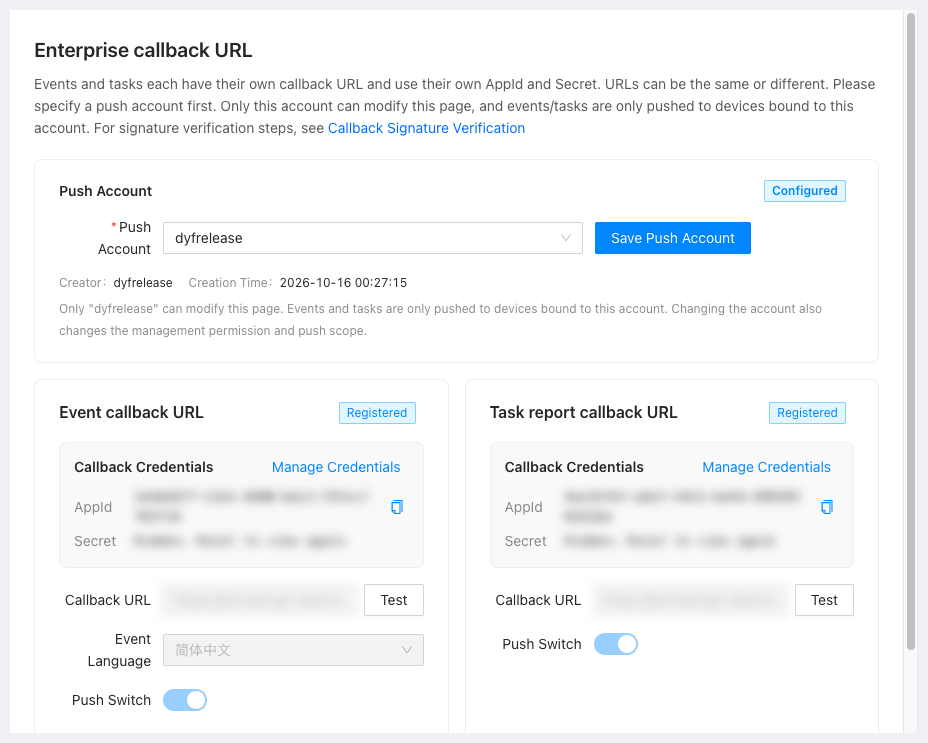
Step 2: Verify the signature
Each push carries X-Gausium-App-Id, X-Gausium-Timestamp, X-Gausium-Nonce and X-Gausium-Signature. The algorithm and examples are in Callback Signature.
Step 3: Test the connection
Click Test in the block and the platform sends one probe to the configured URL. A 2xx response that passes verification means the link is working.
Step 4: Receive and process pushes
Once the link is up, parse reports with the field table below. Read these first:
- What format do task report time fields use: push uses Unix milliseconds, the query endpoint uses seconds.
- Why is taskId or planId missing from a task report: some families and versions do not report them.
- Is durationSeconds = 0 a calculation bug: the field counts actual working time only.
Push is a real-time increment only
Push covers newly generated task reports. For historical reports use Page task reports, and for report images use Query task report map images.
Callback registration requirements
-
Language: Must follow IETF BCP 47 (e.g.
en-US,zh-CN). -
Callback:
url— for examplehttps://{{host}}/callback, HTTP method POST.appId— for example24416c36-d9c7-4d74-a047-d6ca461fxxxx(used for authentication,Provided by Gausium after issuance).
Example curl
curl --location 'https://{{host}}/callback' \
--header 'accept: */*' \
--header 'Content-Type: application/json' \
--data '{
  "appId": "24416c36-aaaa-4d74-aaaa-d6ca461faaaa",
  "payload": {
    "serialNumber": "TEST00-0000-000-XXXX",
    "modelTypeCode": "Scrubber S1",
    "taskReport": {
      "id": "684c183c-4ad9-467b-ac7c-55835255AAAA",
      "taskId": "233123123-d9c7-4d74-a047-d6ca461faaaa",
      "planId": "233123123-d9c7-4d74-a047-d6ca461faaaa",
      "taskInstanceId": "893cbadf-3bb1-45be-b7ef-d590d54fAAAA",
      "displayName": "ceshi2",
      "startTime": 1714124784000,
      "endTime": 1714124890000,
      "robot": "S2153",
      "robotSerialNumber": "TEST00-0000-000-XXXX",
      "operator": "admin",
      "completionPercentage": 0.156,
      "durationSeconds": 106,
      "plannedCleaningAreaSquareMeter": 67.425,
      "actualCleaningAreaSquareMeter": 10.548,
      "efficiencySquareMeterPerHour": 407.965,
      "plannedPolishingAreaSquareMeter": null,
      "actualPolishingAreaSquareMeter": null,
      "waterConsumptionLiter": 0.0,
      "startBatteryPercentage": 38.0,
      "endBatteryPercentage": 38.0,
      "consumablesResidualPercentage": {
        "brush": 100.0,
        "filter": 100.0,
        "suctionBlade": 100.0
      },
      "cleaningMode": "Cleaning",
      "taskEndStatus": 1,
      "subTasks": [
        {
          "mapId": "370192bd-fe7f-40d0-8d0a-4360415bb8cf",
          "mapName": "ceshi2",
          "actualCleaningAreaSquareMeter": 10.548,
          "taskId": "233123123-d9c7-4d74-a047-d6ca461faaaa"
        }
      ],
      "taskReportPngUri": "https://bot.release.gs-robot.com/robot-task/task/report/png/v2/en/684c183c-4ad9-467b-ac7c-55835255aaaa",
      "areaNameList": "2_area1,area2,area3,area4;3_area1,area2,area3"
    }
  }
}'
Top-Level Field Descriptions
| Field | Type | Description |
|---|---|---|
appId | String | Used for authentication, unchanged |
payload | Object | Business data, same structure as in the previous version |
Field description
| Field | Type | Description | Example |
|---|---|---|---|
| payload.serialNumber | String | Robot SN | TEST00-0000-000-XXXX |
| payload.modelTypeCode | String | Robot model code | Scrubber 50H |
| payload.taskReport | Object | Task report | — |
| payload.taskReport.id | String | Task report ID | 684c183c-4ad9-467b-ac7c-55835255AAAA |
| payload.taskReport.taskId | String | Static task ID | 233123123-d9c7-4d74-a047-d6ca461faaaa |
| payload.taskReport.planId | String | Schedule plan ID | 233123123-d9c7-4d74-a047-d6ca461faaaa |
| payload.taskReport.taskInstanceId | String | Task instance ID | 893cbadf-3bb1-45be-b7ef-d590d54fAAAA |
| payload.taskReport.displayName | String | Human‑readable task name | 10F Cleaning |
| payload.taskReport.startTime | Long | Task start timestamp (ms) | 1714290913000 |
| payload.taskReport.endTime | Long | Task end timestamp (ms) | 1714290952000 |
| payload.taskReport.robot | String | Robot display name | S2153 |
| payload.taskReport.robotSerialNumber | String | Robot SN | GS000-XXXX-XXX-XXXX |
| payload.taskReport.operator | String | Operator | Mike |
| payload.taskReport.completionPercentage | Double | Completion percentage (0‑1) | 0.55 |
| payload.taskReport.durationSeconds | Integer | Duration (s) | 300 |
| payload.taskReport.plannedCleaningAreaSquareMeter | Double | Planned cleaning area (m²) | 200.5 |
| payload.taskReport.actualCleaningAreaSquareMeter | Double | Actual cleaning area (m²) | 100.2 |
| payload.taskReport.efficiencySquareMeterPerHour | Double | Cleaning efficiency (m²/h) | 300.7 |
| payload.taskReport.plannedPolishingAreaSquareMeter | Double | Planned polishing area (m²) | 200.5 |
| payload.taskReport.actualPolishingAreaSquareMeter | Double | Actual polishing area (m²) | 200.5 |
| payload.taskReport.waterConsumptionLiter | Double | Water consumption (L) | 5.0 |
| payload.taskReport.startBatteryPercentage | Double | Start battery (%) | 70.0 |
| payload.taskReport.endBatteryPercentage | Double | End battery (%) | 40.0 |
| payload.taskReport.consumablesResidualPercentage | Object | Consumables remaining (%) | — |
| payload.taskReport.consumablesResidualPercentage.brush | Double | Brush life (%) | 50.0 |
| payload.taskReport.consumablesResidualPercentage.filter | Double | Filter life (%) | 50.0 |
| payload.taskReport.consumablesResidualPercentage.suctionBlade | Double | Squeegee life (%) | 50.0 |
| payload.taskReport.cleaningMode | String | Cleaning mode | Sweeping |
| payload.taskReport.taskEndStatus | Integer | End status: −1 Unknown, 0 Normal, 1 Manual, 2 Error, 3 Startup failure | 0 |
| payload.taskReport.subTasks | Array | Sub‑task list | — |
| payload.taskReport.subTasks[0].mapId | String | Map ID | 370192bd-fe7f-40d0-8d0a-4360415baaaa |
| payload.taskReport.subTasks[0].mapName | String | Map name | Demo Map |
| payload.taskReport.subTasks[0].actualCleaningAreaSquareMeter | Double | Actual cleaning area (m²) | 10.0 |
| payload.taskReport.subTasks[0].taskId | String | Sub‑task ID | 233123123-d9c7-4d74-a047-d6ca461faaaa |
| payload.taskReport.taskReportPngUri | String | Task report PNG URI | https://bot.gs-robot.com/robot-task/task/report/png/v2/en/47e3628b-a2b9-4124-bbbc-45e0d4bfaaaa |
| payload.taskReport.areaNameList | String | List of area names | 2_area1,area2,area3 |